


Shoom・AI Music Video Generator
4.22.67K Reviews
App Specs
- Version
- 1.28.10
- Updated On
- License
- Free
- Downloads
- 1,000,000+
- Developer
- TECH ALPHA DMCC
- Categories
- Music & Audio
- Platform
- Android
Screenshots





 Analysis by AppCompare
When I use an AI music app, I care as much about the conditions around creating as I do about the sound: does an idea come together when I have a few spare minutes, and is it easy to pick up again if the process is interrupted? Shoom - AI Music Generator is aimed at making music creation approachable on a phone, though its AI-led approach also means the experience is different from building every note yourself.
Where a connection shapes the creative session
Choosing a direction for a track is only one part of making it. Because Shoom is built around AI music generation, I’d plan to use it when I have a reliable connection rather than assume every stage will work without one. That matters if you’re heading out, commuting through patchy coverage, or trying to make something during a short break: it is better to start a generation when you can stay connected than to count on a session completing smoothly in the background.
I also find it useful to treat each attempt as a draft, not a finished song. If the first result misses the mood I had in mind, I can adjust my creative direction and try again when the connection is stable. That small change in expectations makes the process feel less frustrating: AI generation is a way to explore possibilities, not a guarantee that the first take will be exactly right.
A phone-friendly tool for quick ideas, not every music task
Shoom makes the most sense when I want to test a musical idea without opening a full production setup. I might use it to find a mood for a short personal project, create a starting point for a writing session, or simply see what an AI interprets from the direction I choose. A phone is handy for these quick experiments because I can begin with a rough concept instead of preparing instruments, tracks, and a detailed arrangement.
That convenience has a boundary. If I want precise control over every part, detailed editing, or a carefully arranged final mix, a conventional digital audio workstation is a better fit. Shoom is more appealing as an accessible creative starting point than as a replacement for tools designed around hands-on production. I would also choose a familiar music player, rather than a generator, when all I want is to listen to finished songs.
Recovering from interruptions and making better attempts
Mobile sessions are easy to interrupt, so I’d avoid beginning a generation just before I need to switch apps or lose reception. If a session stalls, my practical response would be to check the connection and reopen the app before making the same request repeatedly. Repeated attempts can make it harder to keep track of which creative direction produced which result, especially when I’m still deciding what I like.
A simple workflow helps: settle on the mood first, make one deliberate attempt, then change one part of the direction at a time if the result feels off. This is more useful than changing several preferences at once, because it gives me a clearer sense of what influenced the next track. I’d also listen to each result before moving on instead of generating a long run of variations; that keeps the session focused and makes it easier to notice whether I’m getting closer to the sound I want.
Worth Reading Before You Choose

Flipboard Shows What News Apps Must Do Beyond the Feed

Switching to Android Auto Means Rethinking Your Driving Routine

Google Calendar Makes a Crowded Week Easier to Manage

Ludo King Makes the Most of the Minutes Between Plans

Baby Panda World Brings Quick Play to Modern Phones, but Its Game Library Feels Busy

ESPN’s Live Game View Makes Following Close Games Easier
Keeping mobile use deliberate
AI music creation can invite repeated experiments, so I’d be mindful of both connection use and the time spent refining an idea. If I’m on a limited mobile plan, I’d save generation sessions for Wi-Fi where practical, rather than assume that repeated creation has no data cost. That is a sensible habit for any connected creative app, particularly when I’m making several drafts to compare.
It is also worth deciding what the track is for before I start. A quick experiment for personal inspiration has a different standard from audio I intend to use in a public project. I would listen closely and check whether the result suits that purpose instead of treating a polished sound as automatic permission or proof that it is ready for every use.
Who will get the most from the app
I’d recommend Shoom to curious beginners, people who enjoy experimenting with sound, and creators who want a quick way to explore a musical mood without first learning a complex production workflow. It can also make a useful prompt for someone stuck at the blank-page stage: hearing an unexpected arrangement may suggest a new direction even if the generated track itself is not the final result.
It is less suitable for musicians who need detailed control, predictable revisions, or a production environment where every element can be shaped precisely. If you are choosing between Shoom and a conventional music editor, ask whether you want the app to propose a composition or want to build one part by part. That distinction is more important than whether you already know music theory.
What to expect from the experience and cost
Shoom is a free Music & Audio app from AIBY Inc., with optional in-app purchases ranging from $1.99 to $39.99 per item. I’d start with the free experience and decide whether its generation style suits me before spending anything. Since the listed purchase prices cover a range, I would check the specific in-app offer and its terms before confirming a payment rather than assume every feature or creation is included at no cost.
The app is rated for Everyone and has an average rating of 4.2 from around 8,100 ratings, with roughly 1,400 written reviews and over 500,000 installs. It was released on July 16, 2024, and version 1.16.1 requires Android 10 or later. Those details help set expectations for availability, but I’d still check that my own phone meets the system requirement before installing.
A realistic use for me would be opening Shoom at home on Wi-Fi after jotting down an idea for a mellow background track. I could choose a direction, listen to the result, and make one measured adjustment if the mood is too energetic. If it starts to feel repetitive, I’d keep the strongest draft as inspiration and move the project into a more controllable music tool rather than spend the whole evening chasing a perfect AI take.
Getting Started with Shoom
First things first, downloading Shoom - AI Music Generator is a breeze. Available on both Android and iOS, you can grab it from your app store and dive straight into the creative process. Once installed, you’re welcomed by a clean and intuitive interface that doesn’t overwhelm you with options, which is great if you’re like me and appreciate simplicity.
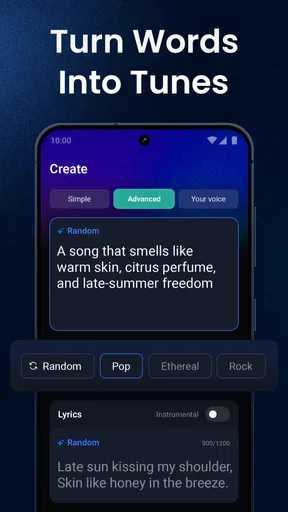
The app uses AI technology to craft music based on your preferences. You can choose different styles and moods, and the AI does the rest. It’s almost like having a personal composer at your fingertips! I found the genre options varied enough to cover most musical tastes, from pop and rock to ambient and classical.
Creating Your First Track
Now, let’s talk about the actual music-making. You start by selecting the mood and genre. The app then lets you tweak a few settings, like tempo and intensity, to further tailor your composition. I experimented with a chill, lo-fi vibe that got my creative juices flowing. The process feels like a collaboration between you and the AI, which is quite an experience.
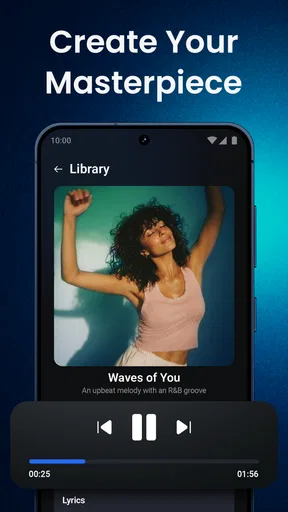
What’s cool is the app’s ability to generate surprisingly sophisticated tracks. You can layer sounds and even adjust individual elements if you’re feeling adventurous. The outcome is a polished piece that sounds like it could be on a streaming playlist. Plus, you can save and share your creations with ease.
What I Loved and Where It Could Improve
One thing I absolutely loved about Shoom is its user-friendliness. You don’t need a musical background to get the hang of it, making it accessible to everyone. The AI-generated music is impressive and can serve as a great starting point for budding musicians or anyone looking to explore their creative side.
However, while the app is pretty fantastic, there’s always room for improvement. I noticed that while the AI is great at generating music, sometimes the tracks can feel a bit repetitive. A few more customization options would be a nice touch to add more personal flair to the compositions.
Final Thoughts
So, is Shoom - AI Music Generator worth your time? If you’re interested in creating music without the steep learning curve, I’d say absolutely. It’s fun, engaging, and offers a unique way to express yourself musically. Just fire it up, let your creativity flow, and see where the music takes you. Whether you’re a seasoned musician or a curious newbie, Shoom provides a playground for musical exploration like no other.
Pros
- Intuitive interface for easy navigation.
- Generates music in various genres.
- High-quality audio output.
- Quick export options available.
- Customizable music parameters.
Cons
- Limited free version features.
- Occasional app crashes reported.
- Requires internet for full functionality.
- Subscription model can be pricey.
- Lacks advanced editing tools.
FAQs for Shoom・AI Music Video Generator
What is Shoom - AI Music Generator?
Shoom - AI Music Generator is a cutting-edge application that allows users to create music using artificial intelligence. The app provides intuitive tools and features that enable both novices and experienced musicians to produce high-quality tracks effortlessly. It’s available for both Android and iOS platforms, making it accessible to a broad audience.
How does the AI music generation work in Shoom?
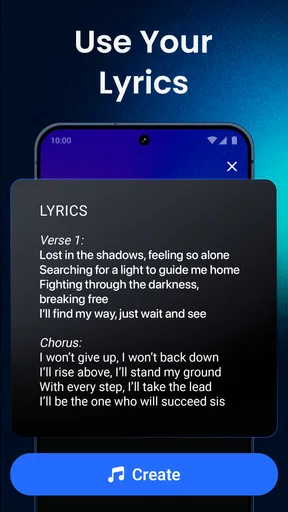
Shoom uses advanced AI algorithms to analyze input parameters such as genre, tempo, and mood to create unique musical compositions. Users can input their preferences or let the AI take control for a surprise element. The AI continuously learns from user interactions, improving its music generation capabilities over time.
What are the main features of Shoom - AI Music Generator?
Shoom offers a range of features including a user-friendly interface, multiple music genres, customizable settings for tempo and mood, and an option to save and export tracks. Additionally, it provides collaboration tools for sharing and co-creating music with other users, making it a versatile platform for music enthusiasts.
Is Shoom suitable for beginners in music creation?
Yes, Shoom is designed to be accessible to beginners while still offering depth for experienced users. The intuitive interface and guided steps make it easy for newcomers to start creating music quickly. The AI handles complex tasks, allowing beginners to focus on creativity without being overwhelmed by technical details.
Are there any costs associated with using Shoom?
Shoom - AI Music Generator offers a free version with basic features, allowing users to explore and create music without any initial cost. For more advanced features, users can opt for a premium subscription, which provides additional tools, higher quality exports, and exclusive content. Pricing details can be found on the app’s download page.


